GuavaTeam + MangoForm + PeachCalendar · updated October 10, 2026
A leads board that fills itself from forms and bookings
The usual way to track leads on a board is a form tool, a booking tool, a card board and a connector in the middle: Typeform, Calendly, Trello and Zapier. Each answer has to become a card, each booking has to find that card and move it, and nothing tells you the call is over.
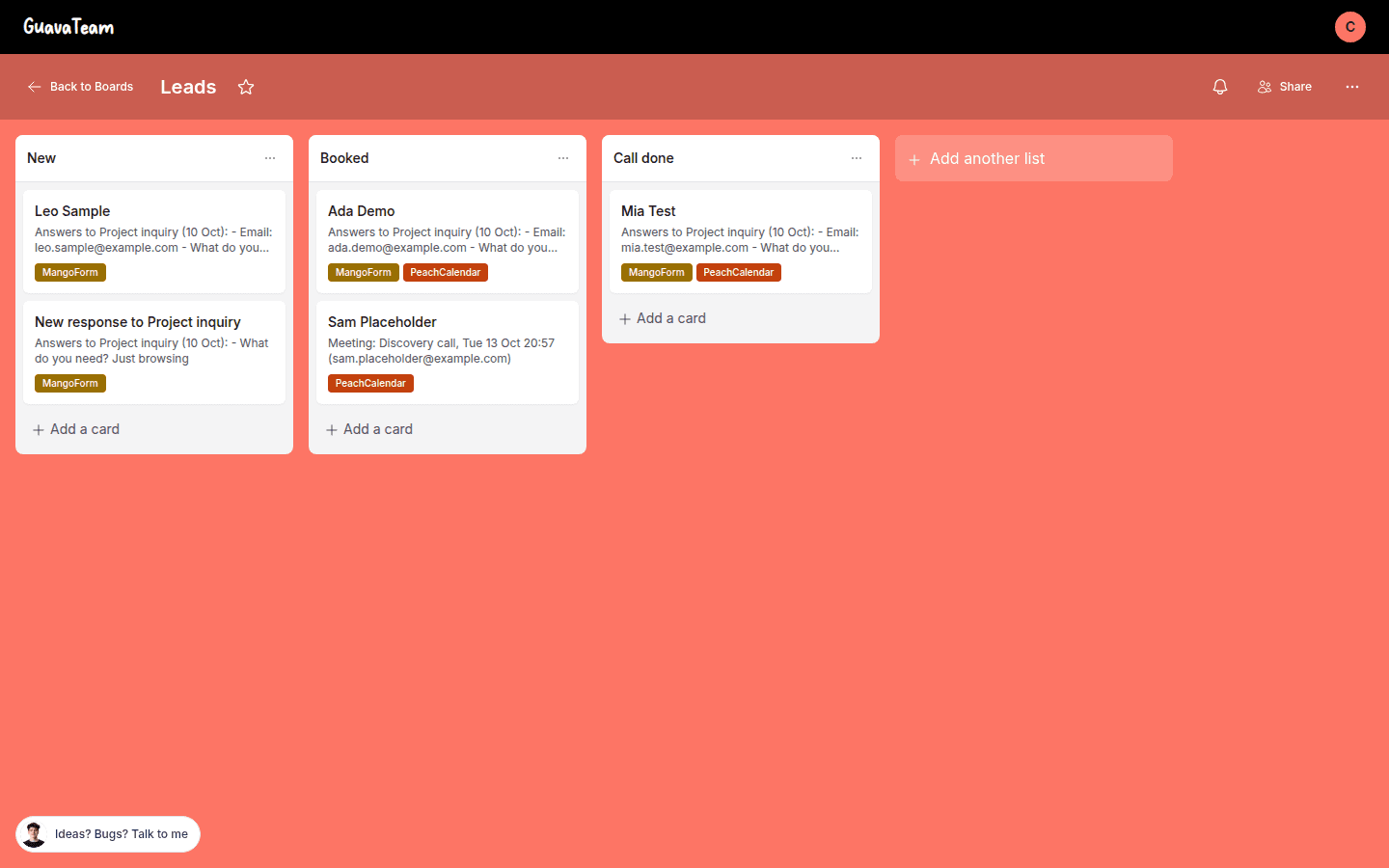
In GuavaTeam's settings there is a button, "Create my Leads board". It builds a board with three columns: New, Booked and Call done. Each answer to a MangoForm form you choose adds a card in New, one card per person by email. A booking of a PeachCalendar meeting type you choose moves that card to Booked, then to Call done once the meeting has ended.
This is for you if
- You get leads through a form and a booking page and want to see where each one stands at a glance.
- You work alone or with a few people and a three-column pipeline is all you need.
- You'd rather pay once than keep a board tool, a connector and a form tool alive every month.
- You already collect leads with our form app or our booking app, so the cards come from what you already have.
This is not for you if
- You need a long pipeline with custom stages, deal values and reports. A CRM does that; this board has three columns.
- Your leads come from a form or booking tool we don't make. The board only reads our own form and booking apps, so keep Trello and Zapier if you live on Typeform and Calendly.
- You want to be pinged when a lead arrives. GuavaTeam has no reminders, no email notifications and no mobile apps; you open the board to look.
- You need cards created for contacts who filled a form last year. Nothing from before the board was created is added.
Trello + Zapier + Typeform + Calendly, or built in
The same job done two ways. Numbers about other tools link to the vendor's own page, with the date we checked it.
| Trello + Zapier + Typeform + Calendly | Built in (our apps) | |
|---|---|---|
| Board | Trello Free is $0 with up to 10 boards per Workspace; Standard is $5 per user/month billed annually and adds unlimited boards.source, 2026-10-10 | GuavaTeam is a $20 one-time purchase, and the Leads board is one of its boards. |
| The connector between them | Zapier Free has two-step Zaps only and 100 tasks a month. Finding a card before moving it is a multi-step Zap, so Professional, starting from $19.99/month.source, 2026-10-10 | No connector. You click a button in GuavaTeam's settings and pick the forms and meetings. |
| The form | Typeform Basic is $28/month billed annually, with 100 responses a month and 1 user.source, 2026-10-10 | MangoForm is a $25 one-time purchase. |
| The booking tool | Calendly's Zapier setup needs Standard or higher, which is $10 per seat per month billed yearly.source, 2026-10-10 | PeachCalendar is a $30 one-time purchase. |
| Moving a card to Call done | Zapier has a Move Card to List action for Trello, but none of the Calendly triggers in Calendly's help page is named for the end of a meeting, so moving a card to a done list after the call is a step you design yourself.source, 2026-10-10 | The card moves to Call done once the meeting has ended. |
| How often it updates | Depends on each Zap trigger; you maintain the mapping from form fields to card fields. | The board is updated every 10 minutes. |
The limits, plainly
Updated every 10 minutes
The board is updated every 10 minutes, so a new answer or booking shows up on the board within about that time, not the second it happens. If you need a card to appear while the person is still on the page, this isn't it.
Your own moves are respected
A card you moved yourself is never moved back. Drag a lead to the column you want and the board leaves it there, even if a later booking would have moved it somewhere else.
Only what happens after you create the board
There is nothing from before the board was created: old form answers and old bookings are not imported. Cards start with the first answer or booking after you click "Create my Leads board".
Three columns, one card per person
The board has New, Booked and Call done. Cards are matched by email, so one person is one card even if they answer twice.
No alerts, no mobile apps
GuavaTeam has no reminders, no email notifications and no mobile apps. The board needs GuavaTeam plus MangoForm, PeachCalendar or both on your account; the bundle includes every app.
What you set up
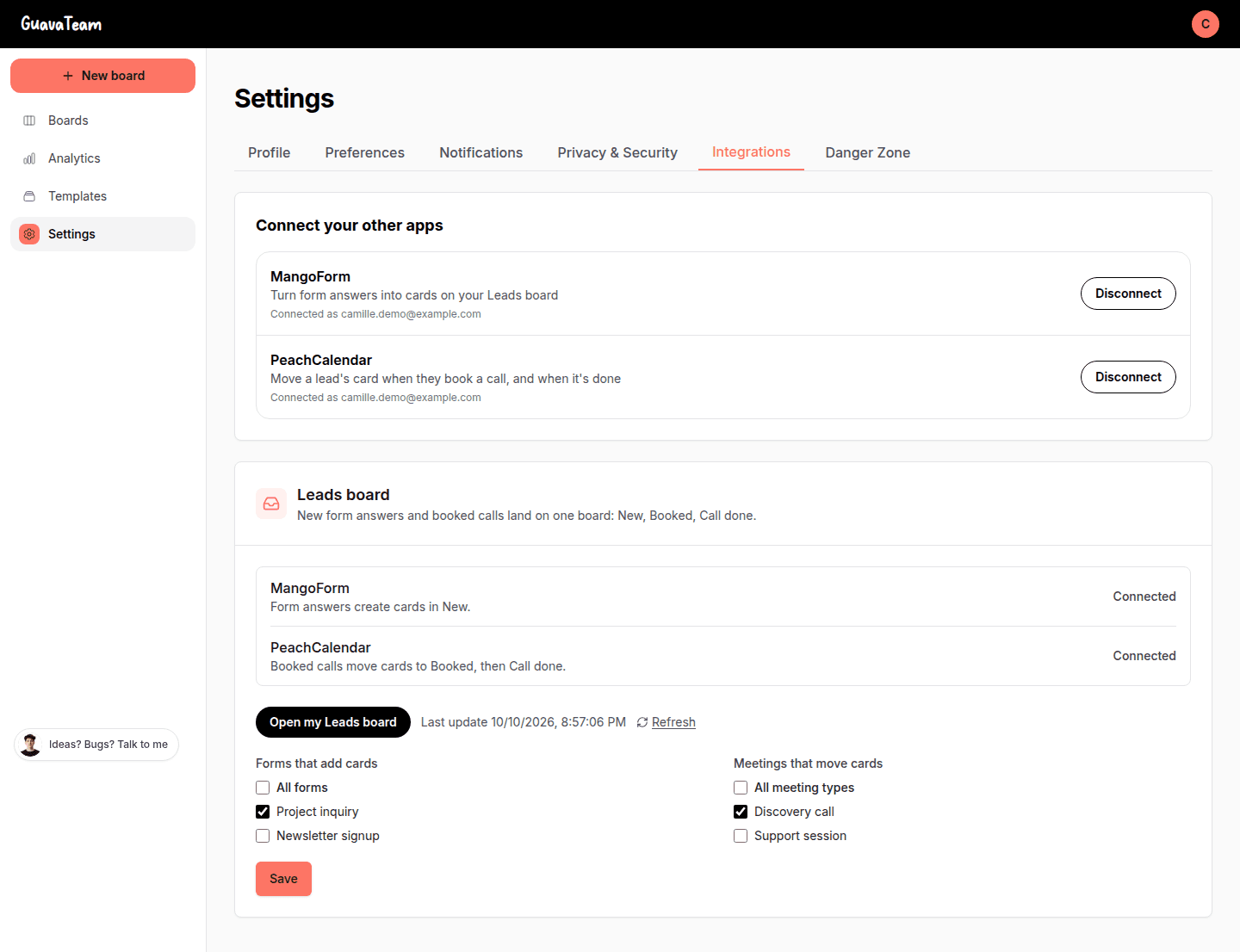
Open GuavaTeam's settings and connect MangoForm, PeachCalendar or both. Each is a "Connect" button, a sign-in if needed and an Allow click, with no key to copy. Then click "Create my Leads board", tick the forms whose answers should add cards, and tick the meeting types whose bookings should move them.
The settings page lists the forms and meetings next to each other, with a button that opens the board.
What happens to a lead
Someone answers your form: a card appears in New with their email as the key. They book a call of a meeting type you picked: the card goes to Booked. The meeting ends: the card goes to Call done. Each card shows a tag for where it came from, the form or the booking.
If you drag a card somewhere yourself, that choice stands. The board only does the boring part, the first three steps, and leaves your own judgment alone.
The Trello and Zapier way, and the bill
The common setup is a Typeform form, a Calendly page, a Trello board and Zapier between them. Zapier has Create Card, Find Card and Move Card to List actions for Trello, so it can be done. But finding the right card and moving it takes more than two steps, and Zapier Free has two-step Zaps only. Calendly itself requires its Standard plan or higher for this connection. Typeform Basic and Trello are billed on top.
I don't say this to knock them. Trello is a better general board than a three-column leads board, and Zapier connects far more apps than I ever will. But for this one job, with these two apps, you pay four subscriptions for what a button does. If you already pay for all four and they work, keep them.
FAQ
How do I create the Leads board?
In GuavaTeam's settings, connect MangoForm and/or PeachCalendar, then click "Create my Leads board". It makes a board with New, Booked and Call done. You then choose which forms add cards and which meeting types move them.
Does one person get several cards?
No. Each answer to a chosen form adds a card in New, with one card per person, matched by email.
Do old answers and bookings show up?
No. Nothing from before the board was created is added. The board starts with what happens after you create it.
How fast does a new lead appear?
The board is updated every 10 minutes. A new answer or booking shows up within about that time.
What if I move a card myself?
A card you moved yourself is never moved back. Your column wins over the board's own moves.
What do I need to buy?
GuavaTeam is $20 one-time, plus MangoForm ($25), PeachCalendar ($30) or both. The bundle is $49 and includes every app, so it covers all three.
Can I do this without Zapier if I use Typeform and Calendly?
Not with this board: it reads only our own form and booking apps. If you want a form that books on its own, see the page on Typeform and Calendly without Zapier.
Pay once. Keep it.
GuavaTeam is $20 one time. The bundle is $29 one time and includes GuavaTeam and our other live apps, with future updates.
Questions? Write to martin@fcksubscription.com. A human (the founder) answers.
Related: Send your intake form to everyone who books, An intake questionnaire that ends on your calendar, A link-in-bio page that books calls and shows testimonials, Ask for a testimonial after every call, Typeform and Calendly without Zapier, how the integrations work, Calendly alternative, Trello alternative, Typeform alternative, Calendly vs Acuity, Calendly vs SavvyCal, Calendly vs YouCanBookMe, Typeform vs Google Forms, Typeform vs Jotform, Typeform vs Tally, Calendly pricing, Trello pricing, Typeform pricing, all use cases.