MangoForm + PeachCalendar · updated October 10, 2026
An intake questionnaire that ends on your calendar
Coaches, consultants, agencies and designers all ask the same thing before a first session: who are you, what do you need, what have you tried, what's the budget. Ask it on the call and the first session turns into paperwork. Send a questionnaire after booking and you end up chasing the people who skip it.
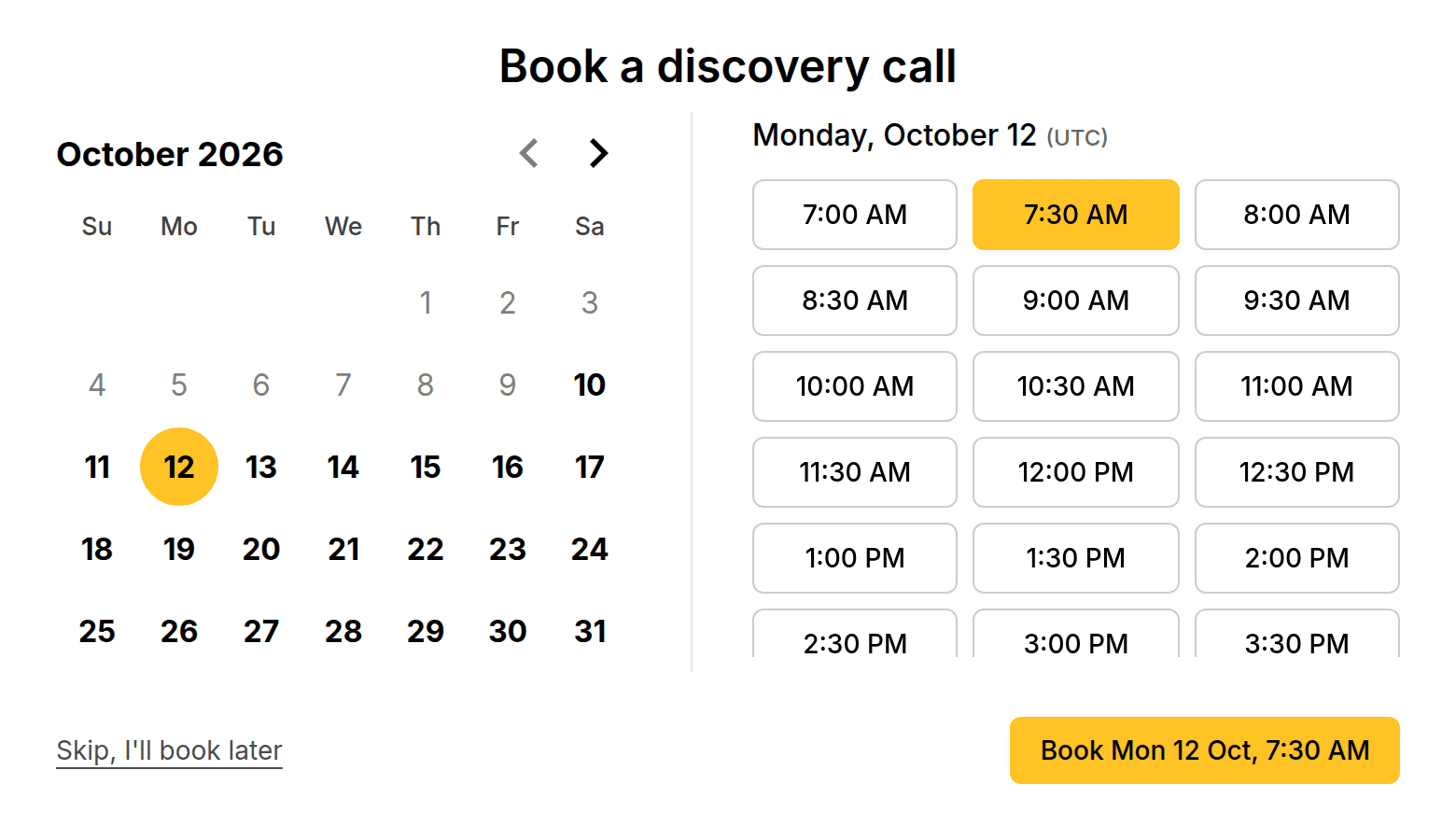
The fix is order. Put the questionnaire first and the calendar last, in a single link. With MangoForm the intake is a real form, with skip logic and around 20 question types, and its final step books a slot in PeachCalendar. Nobody gets on your calendar without having answered.
This is for you if
- Your first session goes better when you've read a proper questionnaire beforehand.
- Your intake needs more than a few short fields: ranking, matrix, scales, or different paths for different kinds of clients.
- You want to stop chasing people who booked but never sent the questionnaire.
- You want to keep a copy of every intake in a table you can export to CSV.
This is not for you if
- Your intake is three or four short questions. Calendly's own invitee questions, on all plans, are enough.
- You need clients to upload documents, sign, or pay a deposit in the intake. MangoForm has no file uploads, signatures or payments.
- You work in a regulated field and need a form vendor with health-records compliance. We make no such claim.
- You route leads to several people on a team. That's what Calendly routing forms on Teams are for.
With Zapier or Make, or built in
The same job done two ways. Numbers about other tools link to the vendor's own page, with the date we checked it.
| With Zapier or Make | Built in (our apps) | |
|---|---|---|
| Questions before the booking | Calendly invitee questions: up to 10 per event type, on all plans, six answer types.source, 2026-10-10 | A full MangoForm intake: around 20 question types, one question at a time, with a progress bar. |
| Different questions for different clients | Calendly routing forms, listed for Teams and up ($16/month per seat billed yearly).source, 2026-10-10 | Skip-to logic in MangoForm: jump to a question or an end screen based on answers. |
| Questionnaire sent after booking instead | A Zap that emails a form link when someone books. A second reminder step makes it multi-step, which Zapier Free doesn't run.source, 2026-10-10 | Not needed: the questionnaire comes first and the calendar is its last step. |
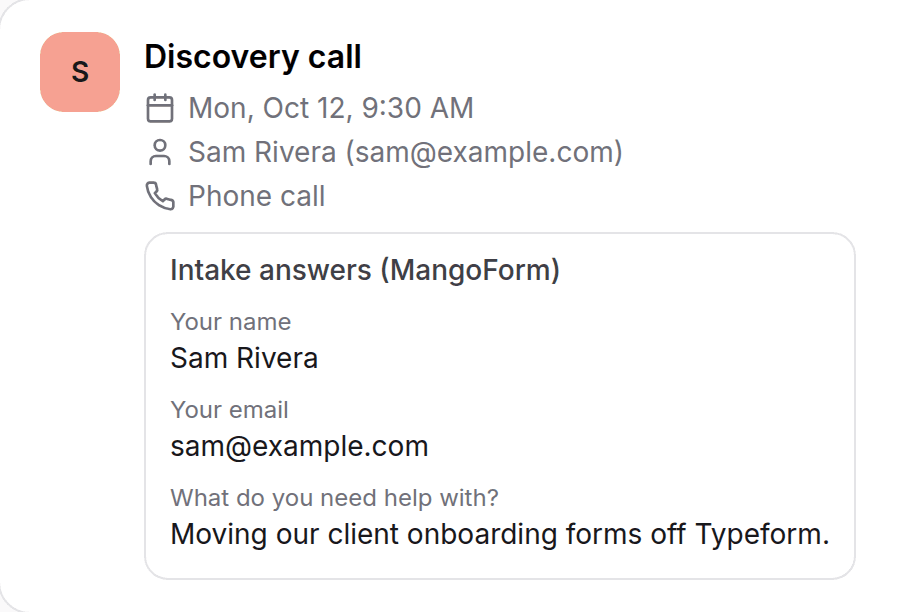
| Reading the intake before the session | Open the form tool, search for the person, match it to the booking by hand or with a Zap. | Open the meeting; the answers are attached to it. |
| Keeping a record | Wherever the form tool stores responses. | MangoForm responses table and CSV export, plus the copy on the meeting. |
The limits, plainly
Shortened on the meeting, complete in the form
Long answers may be shortened when they are attached to the meeting. For a long intake, read the full response in MangoForm before the session; the meeting copy is a summary you glance at.
A daily ceiling per form
Each form takes up to 20 bookings per form per day (UTC). For one-to-one client work that is rarely a constraint.
No double booking of the same session type
The step accepts one upcoming booking per email per event type, so a client can't grab two first sessions at once.
You need both
Both apps must be active on your account for the booking step to appear. Bought separately or through the bundle, it's the same.
Why the questionnaire should come first
When the intake comes after the booking, it becomes homework. The client already has what they wanted, a slot, so the questionnaire waits. You end up sending a nudge, then another, then starting the session without it.
Flip it and the questionnaire is the way in. People who aren't ready to answer five honest questions about their project tend not to book, which is a filter you'd want anyway. People who do answer arrive having thought about what they need.
Building the intake
Start from a template or a blank form. Use short and long text, multiple choice, dropdowns, scales, ranking or a matrix, whatever fits your practice. Skip logic sends a business client and a personal client down different paths, or ends the form early with a polite note when someone is clearly not a fit.
Add your colors, font and logo so it looks like your practice, not like a generic form. If the questions are sensitive, protect the form with a password and share it only with people you've talked to.
Where PeachCalendar fits
PeachCalendar's own booking page doesn't ask custom questions. That's on purpose here: the questions live in MangoForm, and the booking step at the end of the form hands the respondent to your PeachCalendar availability.
From there it behaves like any PeachCalendar booking: weekly availability and date exceptions, the invitee's time zone detected, confirmation emails to both of you, and the event added to your Google Calendar with a Google Meet link if you use Meet.
If Calendly is already your calendar
Then try its invitee questions first. Calendly allows up to 10 custom questions per event type on every plan, which covers a short intake. When you need branching, Calendly routing forms do it, but they are listed for Teams and up at $16/month per seat billed yearly.
The other common route is a separate form tool plus a Zap that sends the form link after someone books. It works, but it is the homework version again, and a reminder step means a multi-step Zap on a paid Zapier plan.
FAQ
How do I make clients fill in an intake form before they book?
Make the intake a MangoForm form and end it with the "Book a meeting" step connected to PeachCalendar. The calendar only appears after the questions, and the answers are attached to the meeting.
Can I ask different questions to different clients?
Yes. Skip-to logic jumps to another question or an end screen based on an answer, so each type of client sees only the questions that apply.
Can clients upload files in the intake?
No. MangoForm has no file uploads. Ask for a link to a shared folder instead, or use a form tool that accepts files.
Will I see the full answers?
On the meeting, long answers may be shortened. The full response is always in MangoForm, in the responses table and the CSV export.
How much does it cost?
MangoForm is $25 one-time and PeachCalendar is $30 one-time. The connection is included, and the bundle includes both apps.
Pay once. Keep it.
MangoForm is $25 one time. The bundle is $29 one time and includes MangoForm and our other live apps, with future updates.
Questions? Write to martin@fcksubscription.com. A human (the founder) answers.
Related: Send your intake form to everyone who books, A leads board that fills itself from forms and bookings, A link-in-bio page that books calls and shows testimonials, Ask for a testimonial after every call, Typeform and Calendly without Zapier, how the integrations work, Calendly alternative, Calendly vs Acuity, Calendly vs SavvyCal, Calendly vs YouCanBookMe, Calendly pricing, all use cases.