MangoForm + PeachCalendar · updated October 10, 2026
Typeform and Calendly without Zapier
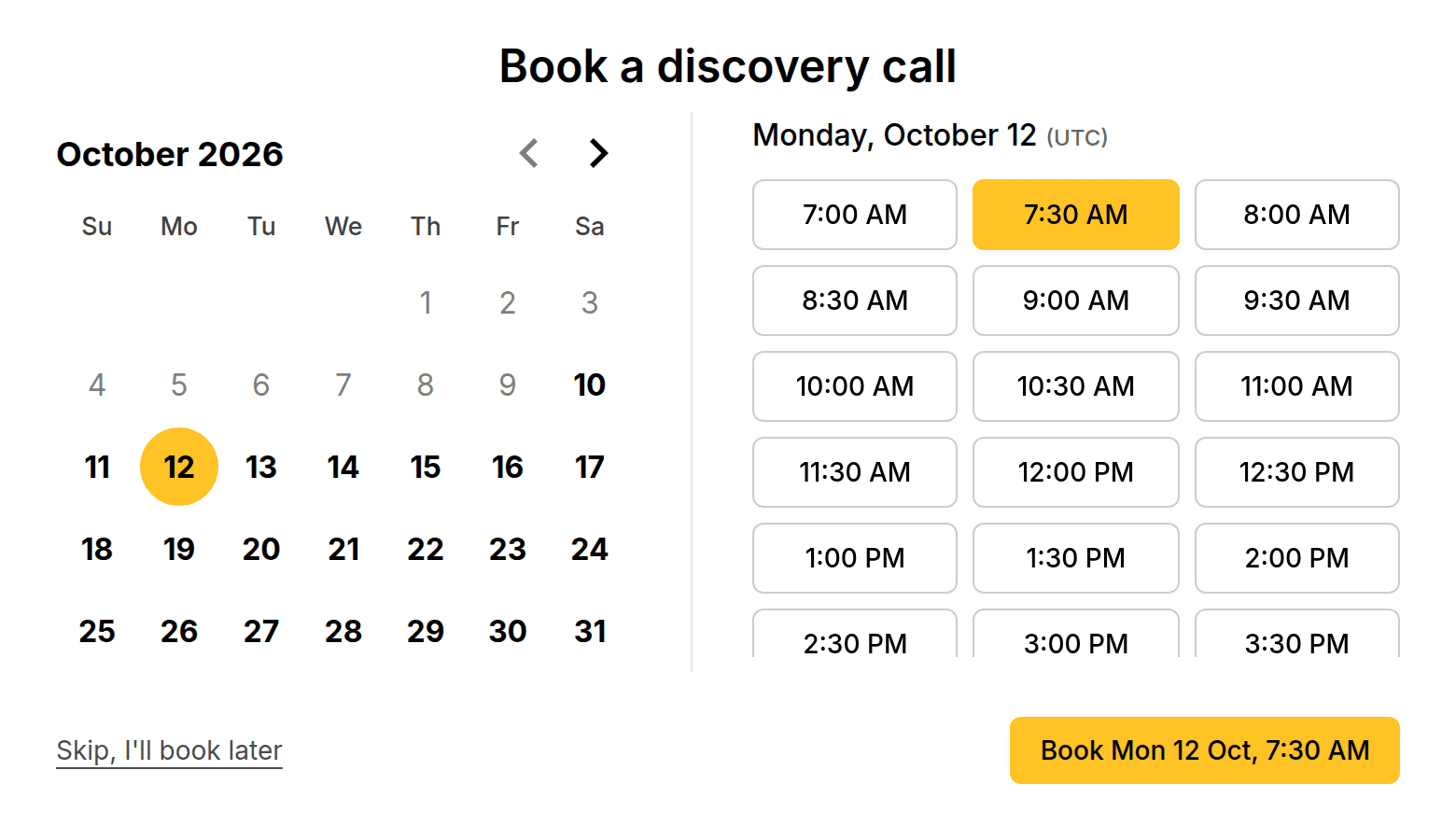
There are two ways to connect Typeform and Calendly without Zapier. The first is Typeform's own Calendly question, which books inside the form but gives Calendly only the name and email (the other answers stay in Typeform Results). The second is a form that books by itself: a MangoForm form can end with a "Book a meeting" step that creates the meeting in PeachCalendar with the form answers attached, up to 20 bookings per form per day.
The usual setup is a Typeform to qualify people, a Calendly link to book them, and a Zap in the middle so you can see the answers before the call. That's three tools, two of them billed every month, plus a glue step that breaks the day someone renames a field. The MangoForm version has no glue: the respondent answers, picks a slot from your PeachCalendar, and you open the meeting to read what they said.
This is for you if
- You run discovery calls, demos or consultations and want to read the answers before you join.
- You want one link to share instead of a form link plus a booking link.
- You'd rather pay once than keep a Zapier plan alive for a single two-app flow.
- Fewer than 20 people a day book through any one form.
This is not for you if
- You need the answers pushed into a CRM, a sheet and Slack at the same time. Zapier or Make does fan-out; this sends answers to one place, the meeting.
- You book for a sales team with round-robin routing. Calendly Teams does that; PeachCalendar is a one-person calendar.
- Your team is standardized on Typeform and Calendly and nobody wants to move. Keep them and keep the Zap.
- You run a webinar or launch where more than 20 people a day book through the same form.
With Zapier or Make, or built in
The same job done two ways. Numbers about other tools link to the vendor's own page, with the date we checked it.
| With Zapier or Make | Built in (our apps) | |
|---|---|---|
| Zapier plan for a form-plus-booking flow | Free allows two-step Zaps only. Copying answers somewhere and notifying you usually means Professional, from $19.99/month billed yearly.source, 2026-10-10 | No Zapier. The booking step is part of MangoForm. |
| Calendly plan the Zap needs | Calendly's Zapier integration is listed from Standard up; Free is not on the list.source, 2026-10-10 | PeachCalendar is a one-time purchase; the connection costs nothing extra. |
| How fast it reacts | Zapier checks for new data every 15 minutes on Free, every 2 minutes on Professional.source, 2026-10-10 | The meeting is created when the respondent picks a slot. |
| What each booking costs | Each successful action step is one Zapier task; triggers and filters are free.source, 2026-10-10 | Nothing per booking. Up to 20 bookings per form per day. |
| Where the answers end up | Wherever your Zap copies them. With Typeform's own Calendly question, Calendly gets name and email and the rest stays in Typeform Results.source, 2026-10-10 | On the PeachCalendar meeting itself, next to the time and the attendee. |
| Setup | Build a Zap, map each field, test it, and fix it when a question changes. | Click Connect in MangoForm, click Allow in PeachCalendar, add the booking step. |
The limits, plainly
Up to 20 bookings per form per day
A single form accepts up to 20 bookings per form per day, counted on the UTC day. Plenty for discovery calls, not enough for a launch-day rush on one form.
One upcoming booking per person and event type
The step allows one upcoming booking per email per event type. Someone who already has a call on the calendar can't stack a second one of the same kind until the first is over.
Long answers may be shortened
The answers ride along with the meeting, but long answers may be shortened there. The full response is still in your MangoForm responses table and CSV export.
Both apps on your account
Both apps must be active on the account that connects them. You can buy them one by one or get them in the bundle, which includes all of our live apps.
What the respondent sees
They open your form and answer one question at a time: what they do, what they need, budget, whatever you ask. The last step shows your free slots. They pick one and the booking is made, with the usual PeachCalendar confirmation emails to them and to you.
They never jump to a second tool to finish. The answers they just typed are not lost between two products, which is the whole point.
What you see before the call
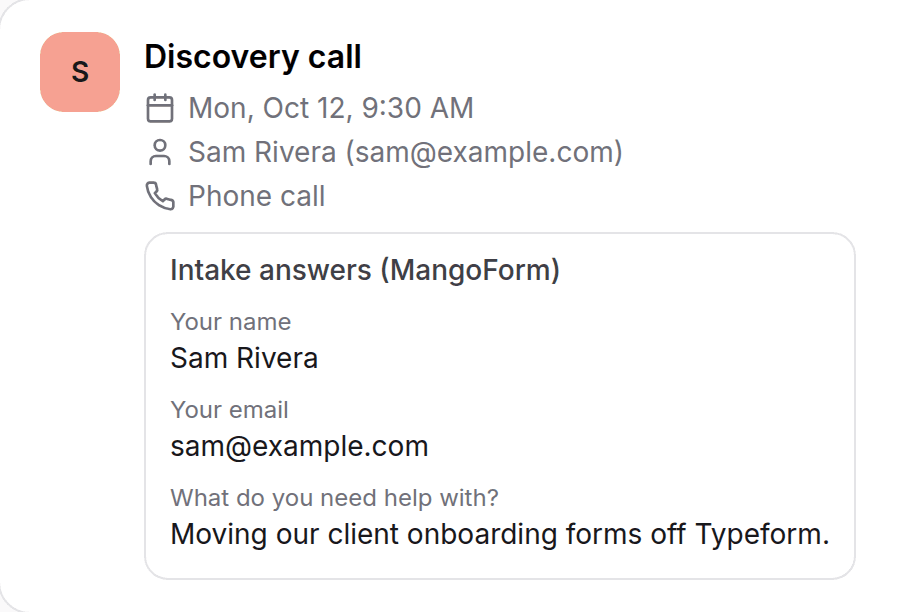
Open the meeting in PeachCalendar and the form answers are attached to it. Who they are, what they asked for, the budget field, the one-line note they typed at the end. You walk into the call knowing whether it's a fit, instead of spending the first ten minutes on questions they already answered.
If you use Google Calendar, PeachCalendar adds the meeting there with the invitee and a Google Meet link, like any other booking.
The Zapier way, and what it costs you
The Zapier version works, and plenty of people run it. Typeform collects the answers, the Calendly link handles the booking, and a Zap copies data between them or into a sheet you check before calls. The catch is the plans underneath. Calendly lists its Zapier integration from Standard up, at $10/month billed yearly. A Zap with more than one action needs Zapier Professional, from $19.99/month billed yearly. Make is cheaper, with Core at $9/month, but it is still a monthly bill and a scenario to maintain.
The hidden cost is upkeep. Rename a question and the field mapping breaks. Change the Calendly event and the Zap quietly stops matching. You find out when you join a call with no context. Typeform does have its own Calendly question, and if you already pay for both tools it removes the Zap for the booking part; just know that Calendly gets name and email and the rest stays in Typeform.
Setting it up
In MangoForm, open Integrations and click Connect PeachCalendar. Sign in to PeachCalendar if asked, then click Allow. Then add the "Book a meeting" step at the end of a form and pick which event type it books. No API key to copy, no webhook URL, no field mapping.
You can remove the connection from either side at any time: from Integrations in MangoForm, or from "Apps that can use PeachCalendar" in PeachCalendar.
FAQ
Can I connect Typeform to Calendly without Zapier?
Yes, Typeform has a Calendly question for booking inside a form, if you already pay for both. Calendly gets the name and email, and the other answers stay in Typeform. If you want the answers attached to the meeting and no monthly fees, MangoForm's booking step does that with PeachCalendar.
Do the form answers show up on the meeting?
Yes. They are attached to the meeting in PeachCalendar. Long answers may be shortened there; the full response stays in MangoForm.
Is there a limit on bookings?
Up to 20 bookings per form per day (UTC day), and one upcoming booking per email per event type.
Does it cost extra?
No. The connection is included. You need both apps on your account: MangoForm is $25 one-time, PeachCalendar is $30 one-time, and the bundle includes both.
Can I still send the answers to a CRM or a sheet?
Yes, with Make or n8n. MangoForm sends a webhook on every new response, on top of the booking step, so a scenario can copy the answers wherever you want them.
Does it work with Outlook or iCloud calendars?
No. PeachCalendar adds bookings to Google Calendar only. If your calendar lives in Outlook or iCloud, this isn't the right setup.
Pay once. Keep it.
MangoForm is $25 one time. The bundle is $29 one time and includes MangoForm and our other live apps, with future updates.
Questions? Write to martin@fcksubscription.com. A human (the founder) answers.
Related: Send your intake form to everyone who books, An intake questionnaire that ends on your calendar, A leads board that fills itself from forms and bookings, A link-in-bio page that books calls and shows testimonials, Ask for a testimonial after every call, how the integrations work, Calendly alternative, Typeform alternative, Calendly vs Acuity, Calendly vs SavvyCal, Calendly vs YouCanBookMe, Typeform vs Google Forms, Typeform vs Jotform, Typeform vs Tally, Calendly pricing, Typeform pricing, all use cases.