GrapeLink + PeachCalendar + MangoForm + KiwiProof · updated October 10, 2026
A link-in-bio page that books calls and shows testimonials
Most link-in-bio pages are a stack of identical buttons that send people somewhere else: one to Calendly, one to a Typeform, one to a testimonial wall. Each of those is another tool with its own monthly plan, and the page itself shows nothing.
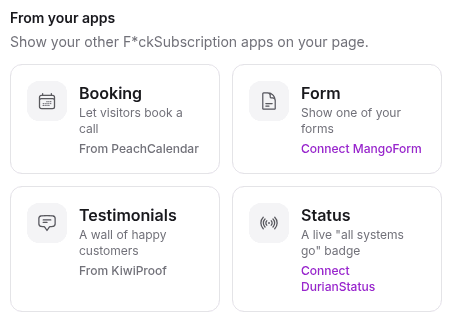
GrapeLink has a "From your apps" section instead. In GrapeLink you pick a booking block from your PeachCalendar, a form from MangoForm, your KiwiProof testimonials widget or a DurianStatus badge, and it shows up on your public page. You choose from a list. There is no embed code to paste.
This is for you if
- You're a freelancer, coach or creator and your bio link is where clients find you first.
- You want people to book a call or send a request from the page, with proof right below the button.
- You're tired of copying embed codes from three dashboards and fixing them when one changes.
- You'd rather pay once for the page, the calendar, the form and the testimonials.
This is not for you if
- You sell products or take tips from your bio page. GrapeLink doesn't sell anything, so pick a tool built for selling.
- You want to collect email sign-ups on the page. GrapeLink has no email capture.
- You need your bio page on your own domain. GrapeLink has no custom domains.
- Your booking, forms and reviews live in tools you're happy with. Keep them; a plain link page is fine for that.
Linktree + separate tools, or built in
The same job done two ways. Numbers about other tools link to the vendor's own page, with the date we checked it.
| Linktree + separate tools | Built in (our apps) | |
|---|---|---|
| A booking calendar on the page | Linktree shows a Calendly calendar on the page only with a Featured Layout link.source, 2026-10-10 | Booking block from your PeachCalendar, with a Book a call button. |
| A form on the page | A Typeform link can be displayed on the page or open the form's URL.source, 2026-10-10 | Form block: pick one of your MangoForm forms. |
| Testimonials on the page | Depends on the testimonial tool; often a link out to a wall hosted somewhere else. | Your approved KiwiProof testimonials, shown on the page. |
| Removing the platform's branding | Linktree Pro, $15/month, or $12/month billed yearly.source, 2026-10-04 | GrapeLink: hide the "Made with GrapeLink" footer, included in the one-time price. |
| Setting up each block | Copy a link or embed from each tool's dashboard and paste it into the page. | Pick from a list in "From your apps". Nothing to paste. |
| Bills behind the page | The page, the scheduler and the testimonial tool each have their own plan; Calendly Standard alone is $10/month billed yearly.source, 2026-10-10 | One-time prices, or all of them in the bundle. |
The limits, plainly
Four blocks, from our apps only
The "From your apps" section of GrapeLink has four blocks: a PeachCalendar booking page, a MangoForm form, a KiwiProof testimonials widget and a DurianStatus status badge. It doesn't embed tools from other companies.
Both apps on your account
Both apps must be active on the account: GrapeLink plus the app the block comes from. The bundle includes all of them, so every block is available.
Only approved testimonials
The testimonials block shows what you approved in KiwiProof, nothing else. An empty inbox means an empty block, so collect a few first.
What a visitor sees
Your avatar, name and bio at the top, then your links. Below them, a booking block with a Book a call button, a contact block with a button that opens your form, and a box with a few of your testimonials. If you run a product, a small badge can say all systems are operational.
The point is order. One clear action near the top, proof right under it, and the rest of your links below. A visitor who is on the fence reads two lines from a past client and then books.
What you do in GrapeLink
In GrapeLink settings, connect the apps you use: click Connect, sign in to the other app if asked, click Allow. Then add a block from "From your apps" and choose which booking page, form or testimonials space it shows. No embed code, no iframe snippet, no API key.
The rest is a normal GrapeLink page: unlimited links you reorder by dragging, 14 preset themes or your own colors, a QR code, a share button, and click counts per link with a device breakdown.
The Linktree way
Linktree can do a version of this. Its help center explains how to show a Calendly calendar on the page with a Featured Layout link, and how to display a Typeform on the page instead of linking out. If you already pay for Linktree, Calendly and a testimonial tool, that works.
The difference is the stack. Linktree Pro is $12/month billed yearly to drop its branding. Calendly Standard is another $10/month billed yearly. A testimonial tool such as Senja is $24/month billed yearly on Starter to drop its branding. Three dashboards, three bills, and three embeds to keep in sync with your page.
FAQ
Can I put a booking calendar on my link-in-bio page?
Yes. In GrapeLink, add the booking block from "From your apps" and pick your PeachCalendar booking page. Visitors see a booking block with a Book a call button on your page.
Can I show testimonials on my link in bio?
Yes, if you collect them with KiwiProof. The testimonials block shows the ones you approved. GrapeLink doesn't import reviews from other sites.
Do I need to paste embed codes?
No. You pick the booking page, form or testimonials space from a list after connecting the app once.
Can I embed a Calendly or Typeform instead?
No. GrapeLink blocks only show our own apps: PeachCalendar, MangoForm, KiwiProof and DurianStatus. You can still add a normal link to any other tool.
What does it cost?
GrapeLink is $8 one-time. Each block needs the other app on your account too, and the bundle includes every app.
Pay once. Keep it.
GrapeLink is $8 one time. The bundle is $29 one time and includes GrapeLink and our other live apps, with future updates.
Questions? Write to martin@fcksubscription.com. A human (the founder) answers.
Related: Send your intake form to everyone who books, An intake questionnaire that ends on your calendar, A leads board that fills itself from forms and bookings, Ask for a testimonial after every call, Typeform and Calendly without Zapier, how the integrations work, Calendly alternative, Linktree alternative, Senja alternative, Calendly vs Acuity, Calendly vs SavvyCal, Calendly vs YouCanBookMe, Senja vs Testimonial.to, Calendly pricing, Linktree pricing, all use cases.