MangoForm + PeachCalendar · updated October 10, 2026
Send your intake form to everyone who books
You offer a call, someone books it, and now you want them to answer a few questions before you meet. Doing it by hand means copying a form link into an email for every booking, and then checking who answered. This page is about taking that job off your plate.
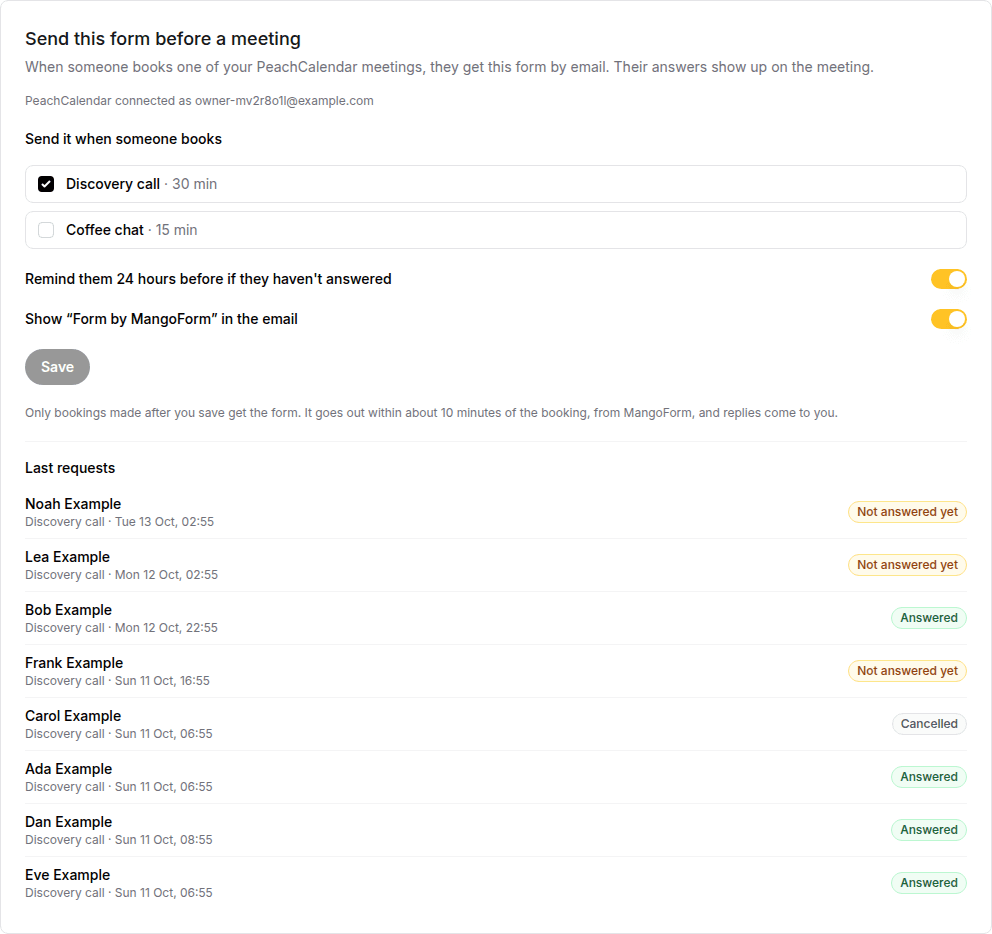
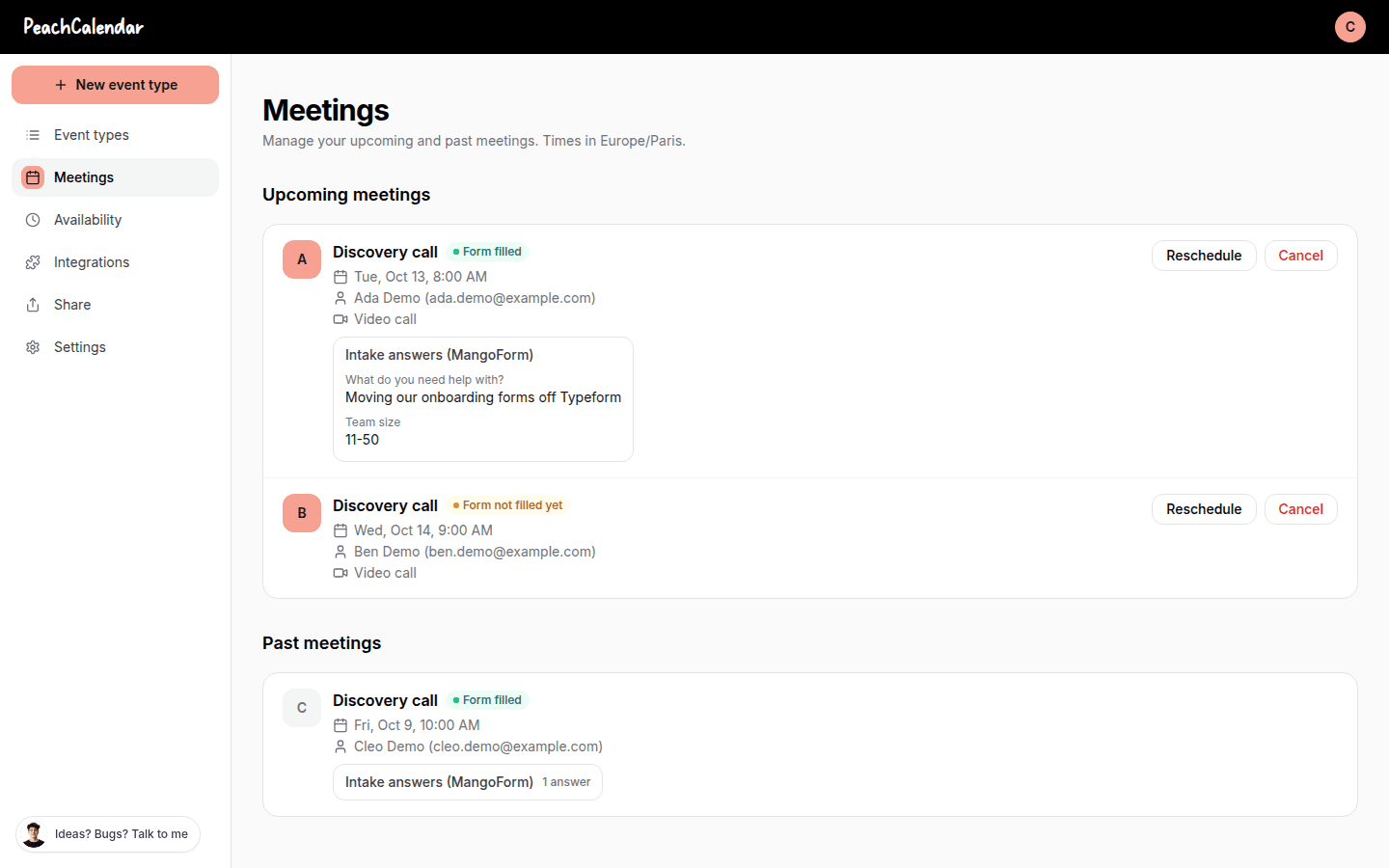
With MangoForm and PeachCalendar connected, you pick which meeting types should come with a form. When someone books one, MangoForm emails them the form within about 10 minutes. PeachCalendar's Meetings page then shows "Form not filled yet" or "Form filled", and the answers when they are in.
This is for you if
- You take bookings first and want the questionnaire to follow, so booking stays one easy click.
- Different meeting types need different forms, or only some need a form at all.
- You are tired of checking who still owes you answers the day before a call.
- You want the answers sitting on the meeting you are about to join.
This is not for you if
- You want nobody on your calendar before they have answered. Put the form first instead; see the section below.
- You need the form to arrive the second someone books. It goes out within about 10 minutes, not in the same moment.
- You need to send several reminders, or choose the delay yourself. There is one reminder, 24 hours before.
- Your team is happy with Calendly invitee questions. A handful of questions on the booking page costs nothing extra there.
Calendly + Typeform + Zapier, or built in
The same job done two ways. Numbers about other tools link to the vendor's own page, with the date we checked it.
| Calendly + Typeform + Zapier | Built in (our apps) | |
|---|---|---|
| Asking questions at booking time | Calendly invitee questions: up to 10 per event type, on all plans, shown on the booking page.source, 2026-10-10 | Not needed for this flow: booking stays one step, and the form arrives by email after it. |
| Emailing a form link after each booking | A Zap with Calendly's Invitee Created trigger sends the email. That trigger needs Calendly Standard or higher, at $10 per seat per month billed yearly.source, 2026-10-10 | Pick the meeting types in MangoForm; the form goes out by email within about 10 minutes of each booking. |
| A reminder for people who have not answered | Needs more than one action step, and Zapier lists multi-step Zaps from Professional, starting from $19.99/month. Free is two-step Zaps only.source, 2026-10-10 | One reminder 24 hours before, only if the form is still unanswered, for meetings booked more than 30 hours ahead. |
| The form tool | Typeform Basic is $28/month billed yearly for 100 responses a month and 1 user; Plus is $56/month for 1,000 responses.source, 2026-10-10 | MangoForm is a one-time $25, and the connection costs nothing extra. |
| Cost per booking | Each successful email step in the Zap is one Zapier task; Free includes 100 tasks a month.source, 2026-10-10 | Nothing per booking. |
| Seeing who has answered | Open Typeform results and match names to your bookings by hand. | PeachCalendar's Meetings page shows "Form filled" or "Form not filled yet" with the answers. |
The limits, plainly
One reminder, 24 hours before
MangoForm sends one reminder 24 hours before the meeting, and only to people who have not answered yet. It is skipped for meetings booked less than 30 hours ahead, because the first email is already close to the call.
Off until turned on
The feature is off until turned on, form by form, in the Connect tab, where you also choose the meeting types it applies to.
Nothing sent for bookings made before
Turning it on affects new bookings only. Nothing sent for bookings made before: people who already booked will not get the form.
Both apps on your account
Both apps must be active on the account that connects them. You can buy them one by one or take the bundle, which includes every live app.
Within about 10 minutes, not at once
The form email goes out within about 10 minutes of the booking. If someone books and the call is in an hour, that is a tight fit; send them the link yourself.
What happens after someone books
They book one of the meeting types you chose, the usual way, on your PeachCalendar page. Within about 10 minutes they get an email from MangoForm titled along the lines of "Before your call with you, a few questions", with an "Answer the questions" button. If they have not answered a day before the call, they get one reminder.
On your side, open the Meetings page in PeachCalendar. Each booking carries a small status: "Form not filled yet" or "Form filled". When the form is filled, the answers show on the meeting, so you read them before you join.
Turning it on
Connect the two apps first: in MangoForm, click Connect PeachCalendar, then Allow in PeachCalendar. Open the form you want to send, go to its Connect tab and find "Send this form before a meeting". Tick the meeting types, and choose whether to keep the 24-hour reminder.
The same panel lists the last requests with Answered or Not answered yet, so you can see how it is going without opening each meeting.
Form first or booking first?
If you would rather nobody gets a slot without answering, use the other order: the form comes first and ends on your calendar. That is the page about an intake form before booking at /use-cases/intake-form-before-booking. It suits long questionnaires and clients you want to qualify.
Use this page's order when booking should stay easy and the questions are about preparing the call, not screening. People who book first are more likely to book, and the email plus reminder does the chasing for you.
The subscription way
The common setup is Calendly for booking, Typeform for the questions and Zapier in the middle. Calendly's Invitee Created trigger starts the Zap, which emails the Typeform link. That trigger needs Calendly Standard or higher, so you pay for the calendar, the form tool and the automation; the reminder is a second action step on a multi-step Zap.
If your questions are short, skip all that: Calendly invitee questions are on every plan, up to 10 per event type. Calendly's pricing page also lists "Automations & reminders" on Standard; check there whether they cover sending a form link before you count on it.
FAQ
How do I send a form automatically after someone books a call?
Connect MangoForm and PeachCalendar, open the form's Connect tab, and tick the meeting types that should get it. From then on, everyone who books one of them gets the form by email within about 10 minutes.
What if they don't fill it in?
MangoForm sends one reminder 24 hours before the meeting if they have not answered, for meetings booked more than 30 hours ahead. PeachCalendar's Meetings page shows "Form not filled yet" so you can follow up yourself.
Will people who already booked get the form?
No. Nothing is sent for bookings made before you turned it on.
Does it cost extra?
No. The connection is included. You need both apps on your account: MangoForm is $25 one-time, PeachCalendar is $30 one-time, and the bundle ($49 regular price) includes every live app.
Can I use a different form for each meeting type?
Yes. Each form has its own list of meeting types, so a discovery call and a follow-up session can each send a different form, or none.
Pay once. Keep it.
MangoForm is $25 one time. The bundle is $29 one time and includes MangoForm and our other live apps, with future updates.
Questions? Write to martin@fcksubscription.com. A human (the founder) answers.
Related: An intake questionnaire that ends on your calendar, A leads board that fills itself from forms and bookings, A link-in-bio page that books calls and shows testimonials, Ask for a testimonial after every call, Typeform and Calendly without Zapier, how the integrations work, Calendly alternative, Typeform alternative, Calendly vs Acuity, Calendly vs SavvyCal, Calendly vs YouCanBookMe, Typeform vs Google Forms, Typeform vs Jotform, Typeform vs Tally, Calendly pricing, Typeform pricing, all use cases.