KiwiProof + PeachCalendar · updated October 10, 2026
Ask for a testimonial after every call
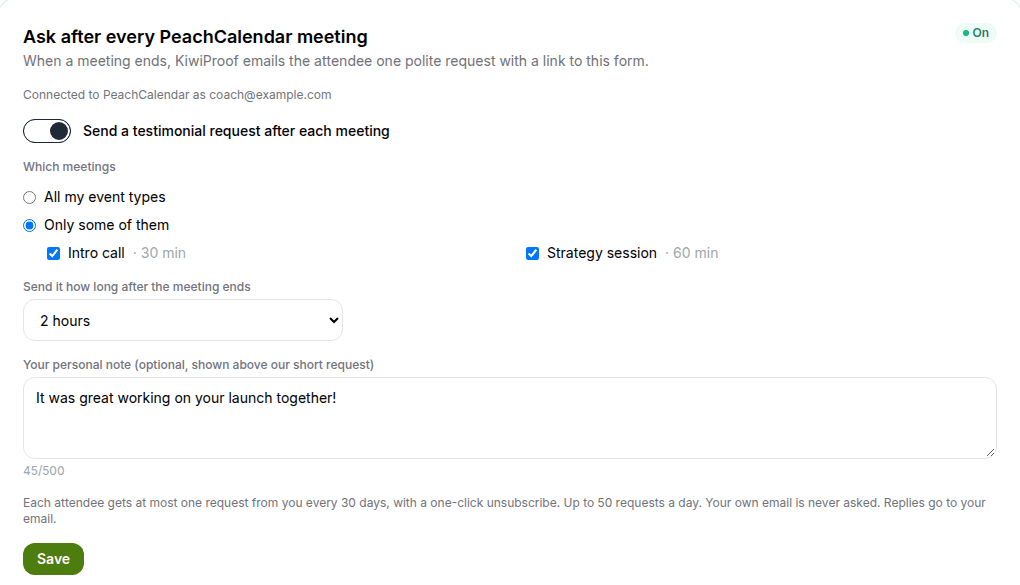
KiwiProof can ask your clients for a testimonial automatically after each call booked with PeachCalendar: one short email per attendee, sent 1 hour to 3 days after the meeting, never more than once per person every 30 days. It's off by default and you approve every answer before it shows anywhere.
Without it, the ask depends on memory. The call went well, the client said thanks, you meant to ask, and then the next call started. A week later asking feels awkward. The usual fix stitches a scheduler's workflow or a Zap to a separate testimonial tool. Here the two apps are connected: when a PeachCalendar meeting ends, KiwiProof waits the delay you picked and sends the attendee a link to your collection form.
This is for you if
- You take paid calls, sessions or consultations through a booking page and never remember to ask afterwards.
- You want a steady trickle of testimonials without writing the same email by hand each week.
- You care about not pestering people: one ask, a polite delay, and an easy way out.
- You want to approve every testimonial before it goes on your site.
This is not for you if
- You want the ask to depend on something outside the calendar, like a deal marked won in your CRM or a project marked done. That is a job for Zapier or Make.
- You want to collect recorded video. KiwiProof takes text and photo testimonials, and video only as a pasted YouTube or Loom link.
- You send more than 50 requests a day. The automatic ask is capped there.
- Your bookings live in Calendly and you're happy there. Calendly Automations on a paid plan can run when an event ends, so build the follow-up there.
With Zapier or Make, or built in
The same job done two ways. Numbers about other tools link to the vendor's own page, with the date we checked it.
| With Zapier or Make | Built in (our apps) | |
|---|---|---|
| What triggers the ask | A Zap on "meeting ended" or a Calendly Automation. Calendly lists both from Standard up; Free is not on the list.source, 2026-10-10 | The end of a PeachCalendar meeting, once you switch it on in a KiwiProof space. |
| Waiting before asking | A delay step plus an email step makes a multi-step Zap, which Zapier Free does not run.source, 2026-10-10 | Pick 1 hour to 3 days (default 2 hours). |
| Not asking the same person twice | You build it: a lookup table or a filter on past sends, and you keep it up to date. | At most one request per person per 30 days, built in. |
| Senja plan with Zapier | Senja's Zapier integration starts on Starter at $29/month billed monthly.source, 2026-10-04 | KiwiProof is a one-time purchase. The bundle includes it with the Pro plan. |
| Testimonial.to automatic asks | Its email assistant (you BCC it on a customer email) is on the Ultimate plan.source, 2026-10-10 | Triggered by the meeting itself; nothing to BCC. |
| Unsubscribe | Whatever your email step supports, set up by you. | One-click unsubscribe in every request. |
| Before it goes public | Depends on the testimonial tool at the end of the chain. | Lands in your KiwiProof inbox. Nothing shows in a widget until you approve it, and only with the reviewer's consent box ticked. |
The limits, plainly
Off by default
The automatic ask is off by default. You switch it on per KiwiProof space, so a client space and a personal space can behave differently.
A delay you choose
One email per meeting attendee, sent after the delay you pick: anywhere between 1 hour and 3 days, 2 hours if you leave the default.
Never more than one ask a month
At most one request per person per 30 days from the same account, even if they book you every week. Regulars don't get the same email four times a month.
One-click unsubscribe, 50 a day
Every email has a one-click unsubscribe, and the system sends at most 50 requests per day. Both apps must be active on your account for the connection to work.
What your client receives
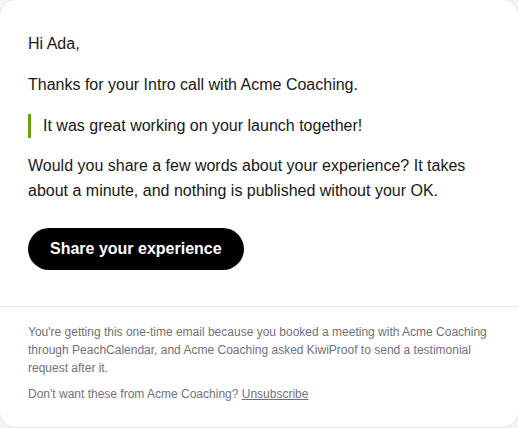
A short, polite email, sent once, after the delay you picked, with a link to your KiwiProof collection form. The form has your brand color, your logo and the question you wrote. No login, no account to create.
On the form they write a few lines, can add a star rating, their role or company and an optional photo, and tick the consent box. That's it. If they'd rather not hear from you this way again, one click in the email stops it.
What happens on your side
Each answer lands in the moderation inbox of the space. You approve it, reject it, fix a typo in the name, or tag it. Only approved testimonials appear in your wall of love, carousel or single-quote widget, and the database refuses to approve one without the reviewer's consent.
Nothing is posted for you and nothing is rewritten. If a client writes two honest sentences, you get two honest sentences.
Why not just do it with Zapier?
You can, and if your trigger is something other than a meeting, you should. The common recipe is a Calendly trigger, a delay, and an email or a testimonial-tool step. It needs a Calendly plan that includes Zapier (Standard or higher, $10/month billed yearly), a multi-step Zap (Zapier Professional, from $19.99/month billed yearly), and usually a testimonial tool with Zapier access, such as Senja Starter at $29/month.
Then there are the parts nobody builds on day one: not asking the same client every week, an unsubscribe link, and a daily ceiling so a busy week doesn't turn into a mail blast. Those are the rules that keep a testimonial ask from turning into spam, and here they are part of the product.
Setting it up
In KiwiProof, open Account (or the card on a space) and click Connect PeachCalendar. Sign in to PeachCalendar if asked, then click Allow. Then, in the space, switch on the request after meetings and pick the delay.
To stop it, switch it off in the space. To disconnect entirely, remove it in KiwiProof, or in PeachCalendar under "Apps that can use PeachCalendar".
FAQ
What app can automatically ask my clients for a testimonial after a call?
KiwiProof, connected to PeachCalendar. After each PeachCalendar meeting it emails the attendee once, after a delay you choose (1 hour to 3 days, default 2 hours), with a link to your testimonial form. It is off by default, sends at most one request per person per 30 days and 50 a day, and every email has a one-click unsubscribe.
How do I automatically ask clients for a testimonial after a call?
Book the call with PeachCalendar, connect it to KiwiProof, and switch on the request in a space. After each meeting, the attendee gets one email with a link to your form, after a delay of 1 hour to 3 days.
Will my clients get spammed?
No. Each person gets at most one request per 30 days from you, every email has a one-click unsubscribe, and sending stops at 50 a day.
Is anything published automatically?
No. Answers land in your KiwiProof inbox. Only testimonials you approve, with the reviewer's consent, appear in your widgets or wall.
Does it work with Calendly or Zoom?
No. The automatic ask is triggered by PeachCalendar meetings only. With Calendly, you can still share your KiwiProof collection link by hand, or use Calendly's own Automations on a paid plan.
Is it on by default?
No. It is off by default and you switch it on per space.
What does it cost?
Nothing extra. You need both apps active on your account: PeachCalendar is $30 one-time, and the bundle includes PeachCalendar and KiwiProof Pro.
Pay once. Keep it.
KiwiProof is $29 one time. The bundle is $29 one time and includes KiwiProof and our other live apps, with future updates.
Questions? Write to martin@fcksubscription.com. A human (the founder) answers.
Related: Send your intake form to everyone who books, An intake questionnaire that ends on your calendar, A leads board that fills itself from forms and bookings, A link-in-bio page that books calls and shows testimonials, Typeform and Calendly without Zapier, how the integrations work, Calendly alternative, Senja alternative, Testimonial.to alternative, Calendly vs Acuity, Calendly vs SavvyCal, Calendly vs YouCanBookMe, Senja vs Testimonial.to, Calendly pricing, all use cases.